Support Document
 Support Document
How to create a New item from manual entry?
- Open the Manual entry module from DashBoard.
- Enter the Quick access password.
There are two ways to create an item from Manual entry
- Open the Manual entry module from DashBoard.
- Enter the Quick access password.
Create a New item from a new invoice:-
After you create a new invoice from manual entry, you will need to click on new item button from the bottom bar to create a new item.
How to create a new Invoice?
Create a New item from Manual Entry
- Click on the New Item button from the bottom bar.
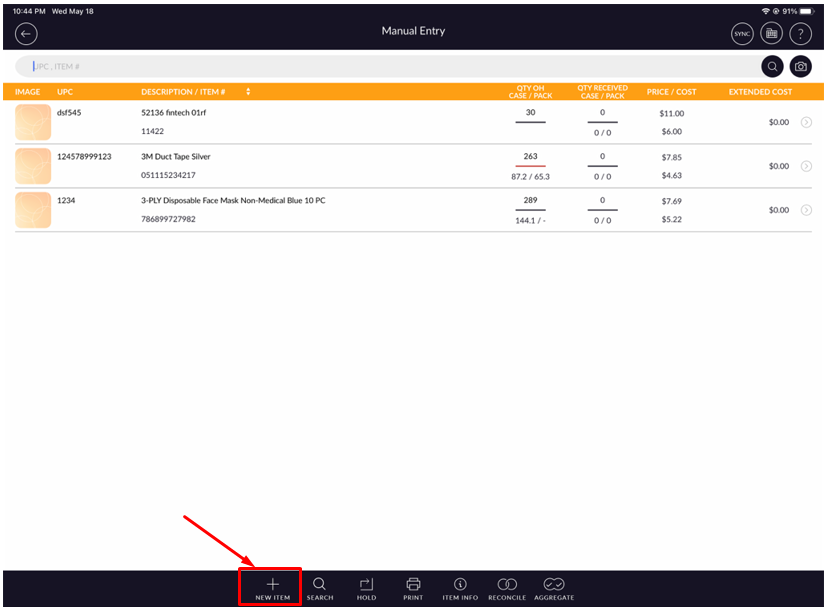
- Enter all details.
- Click on the Save button.
- Item will be added to manual entry list.
- It will open the Received tab.
- Enter Qty OH field.
- Click on the Save button.
- If you do not want to enter anything click on
 button available at the top right side corner of the screen.
Create a New item from the hold invoice:-
How to recall hold invoice?
Create a New item from Manual Entry
- Click on the New Item button from the bottom bar.
- Enter all details.
- Click on the Save button.
- Item will be added to manual entry list.
- It will open the Received tab.
- Enter Qty OH field.
- Click on the Save button.
- If you do not want to enter anything click on
button available at the top right side corner of the screen.