Support Document
 Support Document
How daily sales, gross net sales and net sales calculated in all reports ?
In report all fields like daily sales, Gross net sales and net sales are related to sales in store but there
are minor difference in all as such things are consider and some kind of dedication.
Refer below formula to calculate related fields.
Daily sales = ((Item discounted price with Tax * quantity )+ fees + tips - (refund or payout item discounted price with Tax * quantity))
NET SALES : Net sales represent the clear amount of selling without including tax.
Net sales = Gross net sales - Total tax
Taxes : This field display total tax received by store.
Taxes = Total tax applied in sales item - Total tax applied in refund item.
Deposit : In deposit field it display amount of cash that means amount which store has in terms of deposit.
Opening amount : Opening amount is value which is added at time of shift open.
Note : In all report like shift, x, Z history, ZZ history, centralize shift, Centralize Z and in centralized ZZ there are field of Daily sales, gross net sales and net sales available.
For that all calculation, take scope of transaction between particular report and apply formula as according.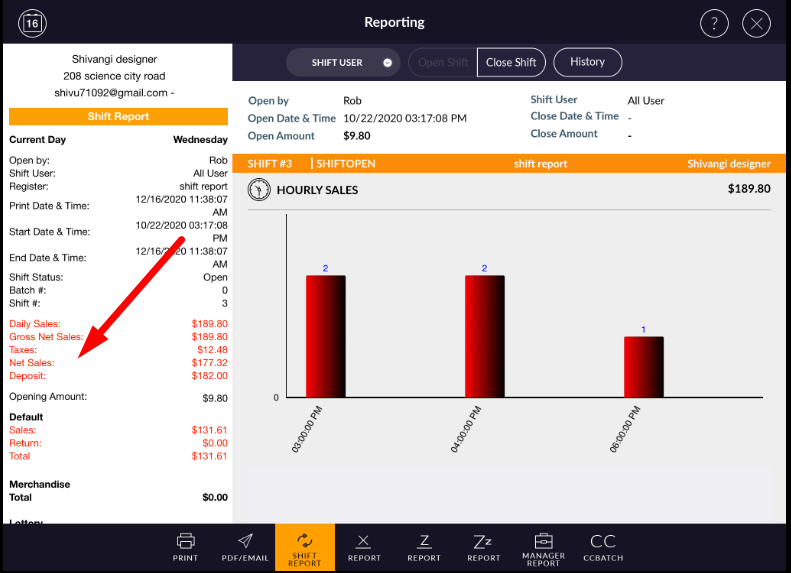
Refer below formula to calculate related fields.
- • DAILY SALES : Daily sales represent sum of grand total in POS screen.
Daily sales = ((Item discounted price with Tax * quantity )+ fees + tips - (refund or payout item discounted price with Tax * quantity))
- • GROSS NET SALE : Gross net sales represent the clear amount which POS have by selling, extra things are not calculated.
NET SALES : Net sales represent the clear amount of selling without including tax.
Net sales = Gross net sales - Total tax
Taxes : This field display total tax received by store.
Taxes = Total tax applied in sales item - Total tax applied in refund item.
Deposit : In deposit field it display amount of cash that means amount which store has in terms of deposit.
Opening amount : Opening amount is value which is added at time of shift open.
Note : In all report like shift, x, Z history, ZZ history, centralize shift, Centralize Z and in centralized ZZ there are field of Daily sales, gross net sales and net sales available.
For that all calculation, take scope of transaction between particular report and apply formula as according.