Support Document
 Support Document
How to collect payment in house charge?
In customer loyalty when customer want to use house charge and there is a negative amount is in house charge
and customer want to collect amount then it can be possible from customer loyalty.
- Open Rapid RMS application.
- Go to Cash register module.
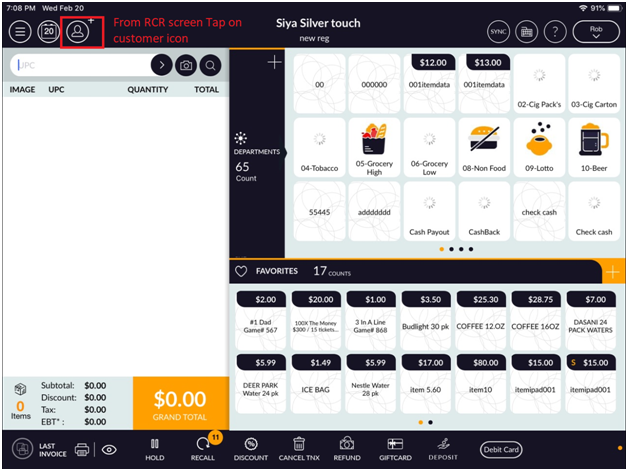
- From the top screen, tap on customer icon
- From customer list, Tap on ‘View’ icon and go to House charge page.
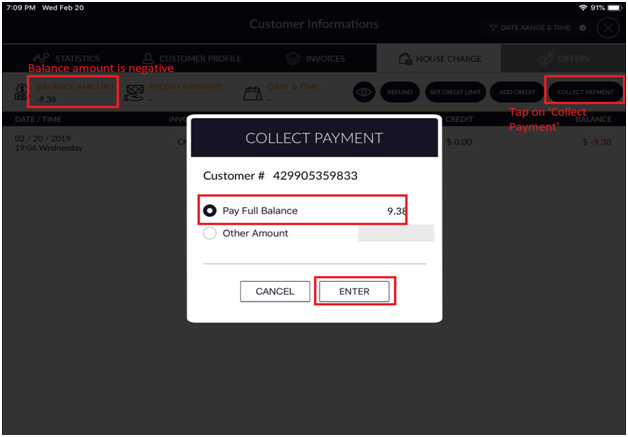
- Now From House, charge page check ‘collect Payment’ button and verify if Balance amount is negative (-50) then the button will be Enable mode otherwise it will disable.
- Now If ‘Balance Amount’ is negative then tap on Collect payment.
- Choose ‘Pay full balance’ or ‘Other Amount’ option with amount and tap on ‘Enter button.
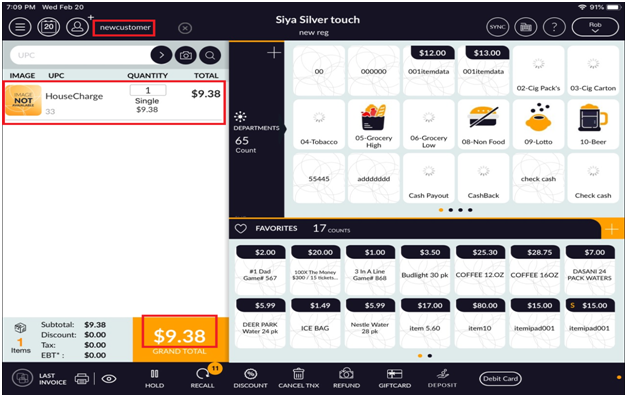
- Now you will see, the page will redirect in RCR bill screen with House charge Item.
- Now from RCR screen, complete house charge transaction by any payment type (EX: Cash )